Ganvexa Consulting
Most distributors don't have a stock problem. They have a timing problem. They need to buy weeks before they know what customers will order, and the decision usually rests on a spreadsheet export and one experienced buyer's memory. AI demand forecasting replaces that guesswork with a daily, checked answer.
When that works, nobody notices. When it doesn't, it shows up in two places at once: an empty shelf on the item everyone wants, and a corner of the warehouse full of stock nobody has asked for in months.
What is AI demand forecasting?
AI demand forecasting uses your own sales history to predict how much of each product customers will buy in the coming days and weeks, and automatically picks the forecasting method that has proven most accurate for each product. It is the base of AI stock management: knowing what will run out, how much to reorder and by when, instead of relying on fixed minimums and memory.
Why stock reordering goes wrong for distributors
- Averages hide the pattern. "We sell about 200 a week" ignores seasons, promotions and the one-off bulk order that made last month look busier than it was.
- Supplier delivery times are guesses. The price list says 7 days. In practice it's often 12, and that difference is exactly when the shelf runs empty.
- Nobody sees what's already on the way. An order placed last week, or a draft nobody confirmed, gets forgotten, and the same item is ordered twice.
- Packs and minimums complicate every order. You need 69, the supplier sells in cartons of 24 with a minimum of 20 cartons. The spreadsheet doesn't know that.
- Reports look backwards. They tell you what sold last month, not what to order today or what will run out next Tuesday.
The fix: AI stock management inside Odoo, one daily answer
The information needed to order well is already in Odoo: what you sold, what you have, what's on the way, how long each supplier really takes, and how they want you to order. The missing piece is something that puts it together every day and says, in plain words, what to do next.
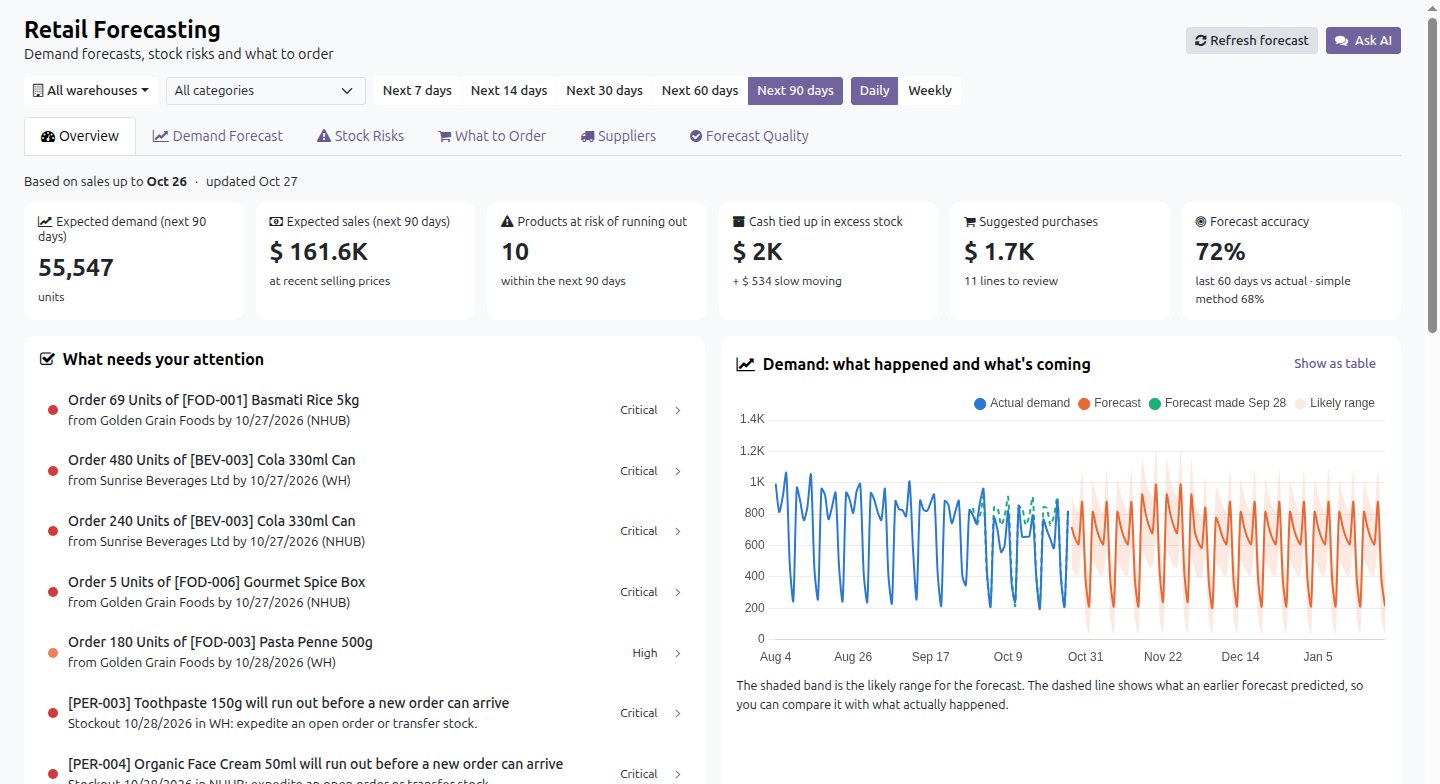
That's what we built: an AI demand forecasting and reordering add-on for Odoo 19. Each morning it answers three questions for every product in every warehouse:
- What will we sell? Expected sales for the next 7, 14, 30, 60 or 90 days, with a likely range.
- What will run out? Products that will run out before a new order can arrive, with the date.
- What should we order today? Quantities, supplier, cost and the last day to place the order.
AI forecasting that's checked, not assumed
Every product gets its own demand forecast for each warehouse. Behind the scenes several proven forecasting methods compete, and each one is tested against what you actually sold in recent weeks. A method is only used if it beats a simple "same as recent weeks" estimate. If none does, the simple one is used, and nobody pretends otherwise.
It also cleans up the history before it learns from it. Days when the item was out of stock don't count as "zero demand", and a one-off bulk order doesn't get treated as the new normal. Every forecast shows a confidence level (high, medium or low), so your team knows which numbers to trust and which to double-check.
AI stock-out alerts: spot problems before customers do
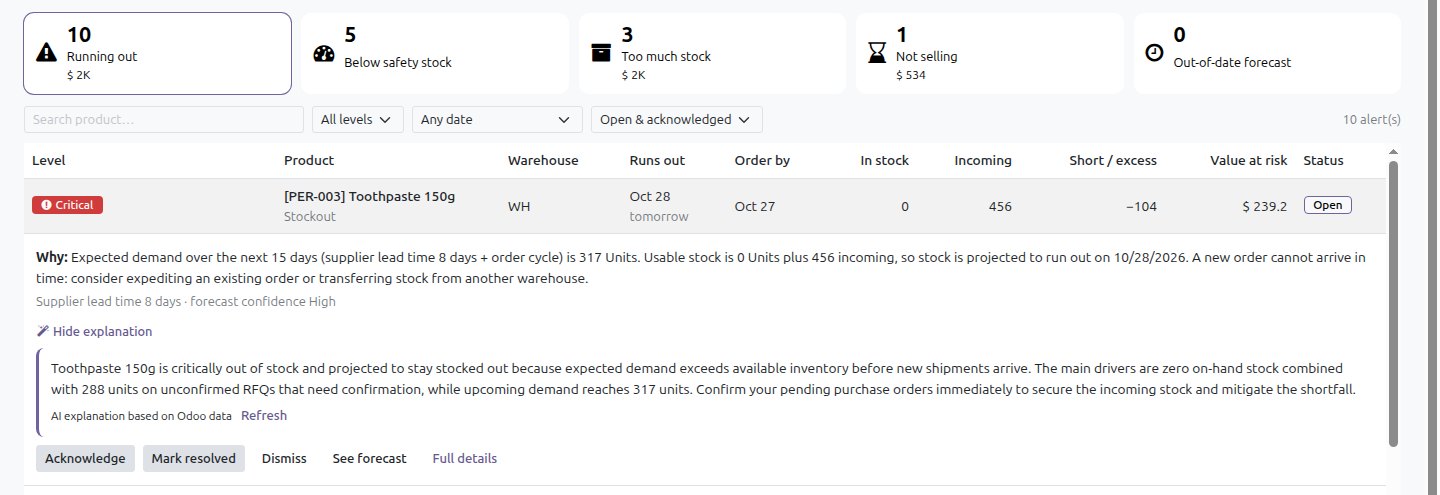
The Stock Risks screen lists what's about to go wrong, most urgent first:
- Will run out: the date it runs out, the last day to order, and the sales at risk.
- Arrives too late: an order is on the way, but it lands after the shelf is empty. The fix is to ask the supplier to deliver sooner or move stock from another warehouse.
- Too much stock: more than you aim to hold, with the cash tied up in it.
- Not selling: items that haven't sold for months, so you can sell them off, return them or stop reordering.
AI reorder suggestions: from "we're running low" to a draft purchase order
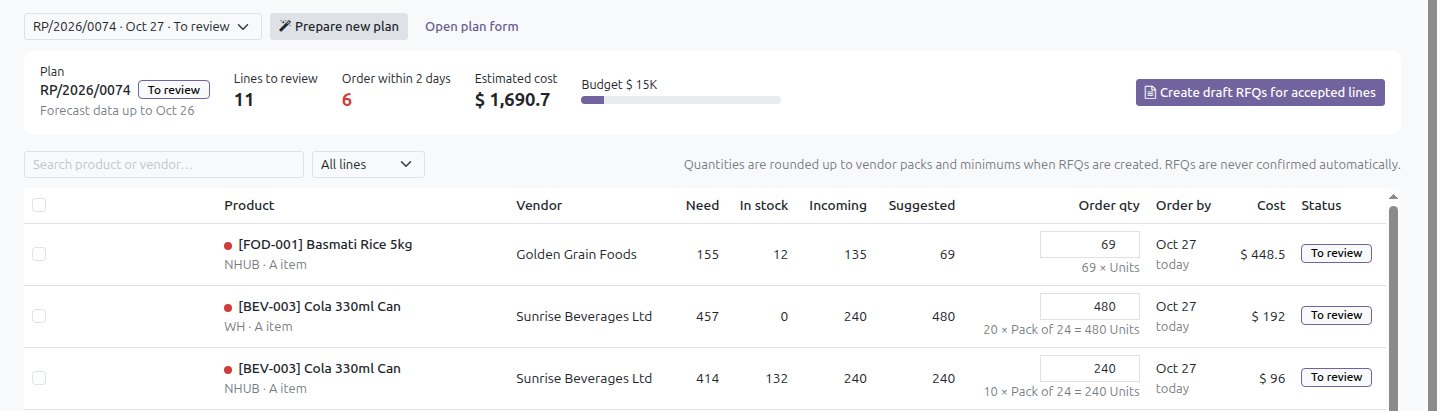
The What to Order list turns the forecast into reorder suggestions. It does the arithmetic a buyer would do by hand, line by line, and shows it:
- Expected sales until the supplier delivers and your next order is placed.
- Plus a little extra kept just in case sales are higher or the delivery is late.
- Minus what's already on the shelf and what's already ordered and arriving in time, including drafts nobody has confirmed yet.
- Rounded to the supplier's packs and minimum order, and checked against your monthly budget.
The buyer accepts or adjusts each line, then creates one draft request for quotation per supplier with a single click. Nothing is ever confirmed automatically. People stay in charge of what gets bought.
Where generative AI helps, and where it doesn't
We were deliberate about this. The quantities come from tested calculations on your own data, not from an AI model. That keeps them consistent, explainable and the same every time you look.
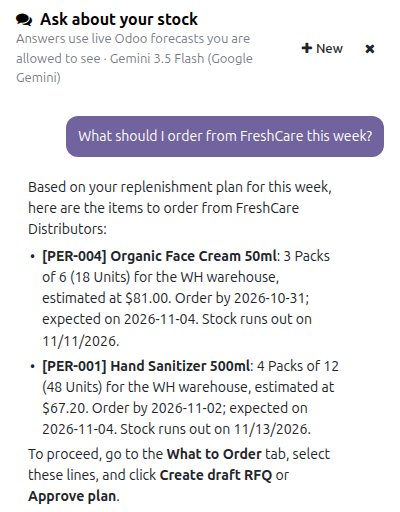
The AI does the part people find tedious: explaining. Next to every alert and suggestion there's a Why? button that explains it in two or three plain sentences. Buyers, sales and finance can also ask questions in everyday language:
- "What should I order from FreshCare this week?"
- "What runs out before the next delivery?"
- "Where is cash tied up in stock?"
The answer comes from live Odoo data in a few seconds, with links to the products it mentions. You can choose Google Gemini or Anthropic Claude, with a second model as backup. The AI can read data but never change it, each person only sees the warehouses they're allowed to see, and supplier names can be hidden from the AI provider.
What AI demand forecasting looks like on real numbers
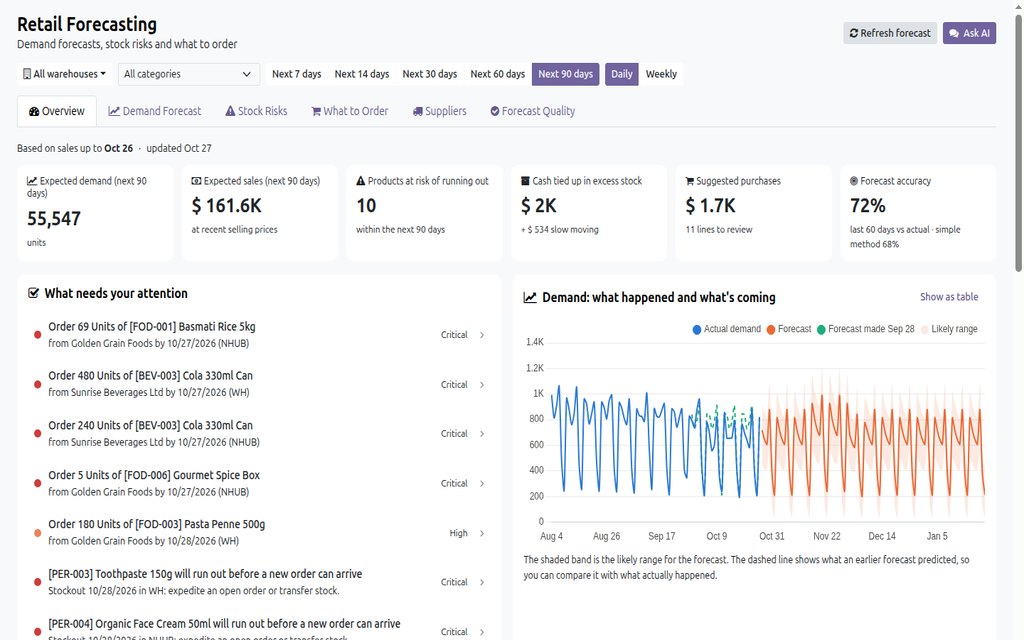
On our demo company, with two years of simulated sales across two warehouses, the first run:
- Forecast sales with 72% accuracy against what actually sold over the last 60 days, compared with 68% for a simple average.
- Found 10 products that would run out, each with the last day to order.
- Made $2.5K of excess and slow-moving stock visible, item by item.
- Answered AI questions in 2 to 4 seconds, at a fraction of a US cent each.
Your numbers will be different. That's why we always start on a copy of your own database.
How to start with AI inventory forecasting in Odoo
- Check your supplier details in Odoo: who you buy each product from, their real delivery time, packs and minimum order.
- Make sure deliveries and receipts are recorded in Odoo, not just invoices. Forecasts learn from what actually moved.
- Start with your fast movers and one warehouse. Compare the suggestions with what your buyer would have ordered for a few weeks, then widen it out.
If stock is also spread across several warehouses, read how distributors keep multi-warehouse stock straight in Odoo. We set tools like this up as part of our Odoo implementation and support work.
Common questions
What is AI demand forecasting?
AI demand forecasting predicts how much of each product customers will buy from your own sales history. Several forecasting methods are tested against recent sales for every product and warehouse, and the most accurate one is used. The forecast then drives stock-out alerts and reorder suggestions.
How is AI stock management different from Odoo reordering rules?
Standard Odoo reordering rules reorder when stock drops below a minimum that someone sets by hand and has to keep up to date. AI stock management recalculates expected demand every day from your own sales, supplier delivery times, packs and minimums, so reorder quantities follow seasons and trends instead of a fixed number.
Is the AI deciding how much stock we buy?
No. The quantities come from statistical calculations on your own sales, stock and supplier data in Odoo. The AI only explains the numbers in plain words and answers questions. A person reviews every suggestion, and purchase orders are only created as drafts.
Does this work on Odoo Community as well as Enterprise?
Yes. It runs on Odoo 19 Community and Enterprise and uses the standard Inventory, Sales and Purchase apps, so there is no second system to keep in sync.
How much history do we need for useful forecasts?
A year or more of sales lets it pick up seasonal patterns, but it starts working with a few months. Products with very little history are flagged with a low confidence so your team knows to check them by hand.
What does the AI part cost to run?
Very little. It only sends the data a question needs and reuses saved answers. On our demo data a typical question cost a fraction of a US cent. You can also set a monthly budget, or switch the AI off and keep everything else.
AI demand forecastingAI forecastingAI forecastAI stock managementAI inventory managementAI inventory forecastingAI reorderAI reordering suggestionsOdoo demand forecastingOdoo inventory forecastingOdoo reordering rulesstock replenishmentpurchase planningstock-out preventioninventory planning for distributors